Modernizing a Complex POS Workflow for Retail Store Teams
Enterprise UX · Workflow Design · Interaction Design · POS Modernization
Overview
As a Senior UX Designer at O’Reilly Auto Parts, I redesigned an enterprise point-of-sale system used across 6,400+ retail stores in the United States, Canada, and Mexico. One area I focused on was the Transactions Recall workflow—the process store employees use to locate and retrieve previous transactions. The existing experience relied on a legacy POS interface with multiple screens, system messages, and decision points. My work focused on improving the flow and redesigning system prompts to make the experience clearer and easier to navigate.
The Challenge
The original Transactions Recall experience required employees to move through multiple screens and interpret a series of system states and prompts. The workflow contained several opportunities for confusion:
- Multiple screens to complete a single task
- Legacy interface patterns
- System-generated prompts that were difficult to interpret
- Limited visual hierarchy
- Inconsistent presentation of errors and confirmations
- Additional steps when a transaction could not be found or needed further action
Because the POS is used in a fast-paced retail environment, employees need to understand what is happening and what action to take without unnecessary cognitive effort.
My Role
As a Senior UX Designer, I analyzed the existing workflow and redesigned the Transactions Recall experience as part of the broader POS modernization effort. My responsibilities included:
- Reviewing the existing transaction workflow
- Identifying usability issues and unnecessary complexity
- Mapping the existing interaction flow
- Redesigning screens and system prompts
- Creating clearer interaction patterns
- Improving hierarchy and readability
- Establishing more consistent confirmation and error states
- Designing the updated experience within the constraints of an enterprise POS
- Collaborating with product and development teams throughout the redesign
Tools: Figma · Enterprise POS · UX/UI Design · Interaction Design
Design/Workflow
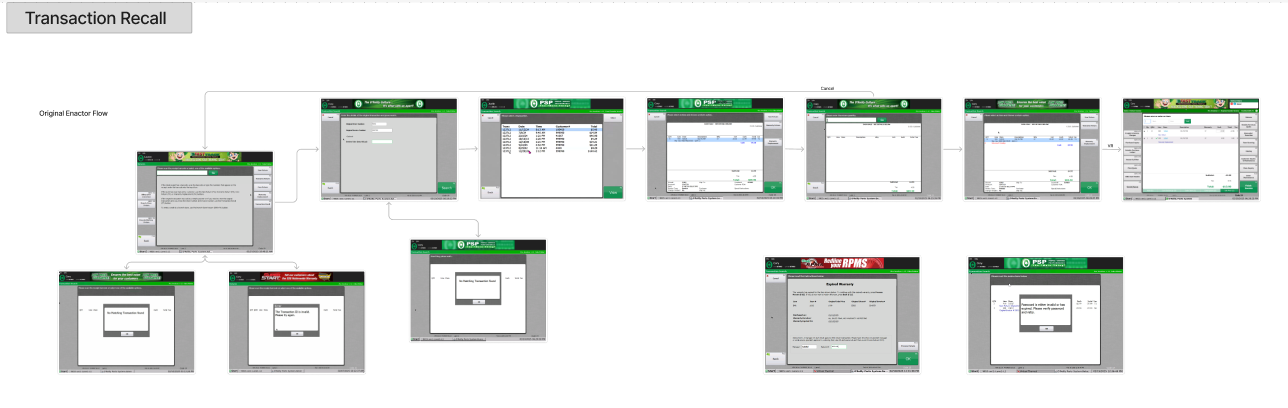
The original workflow used the Enactor POS interface. The flow required employees to navigate several screens and respond to system prompts while searching for and recalling transactions.
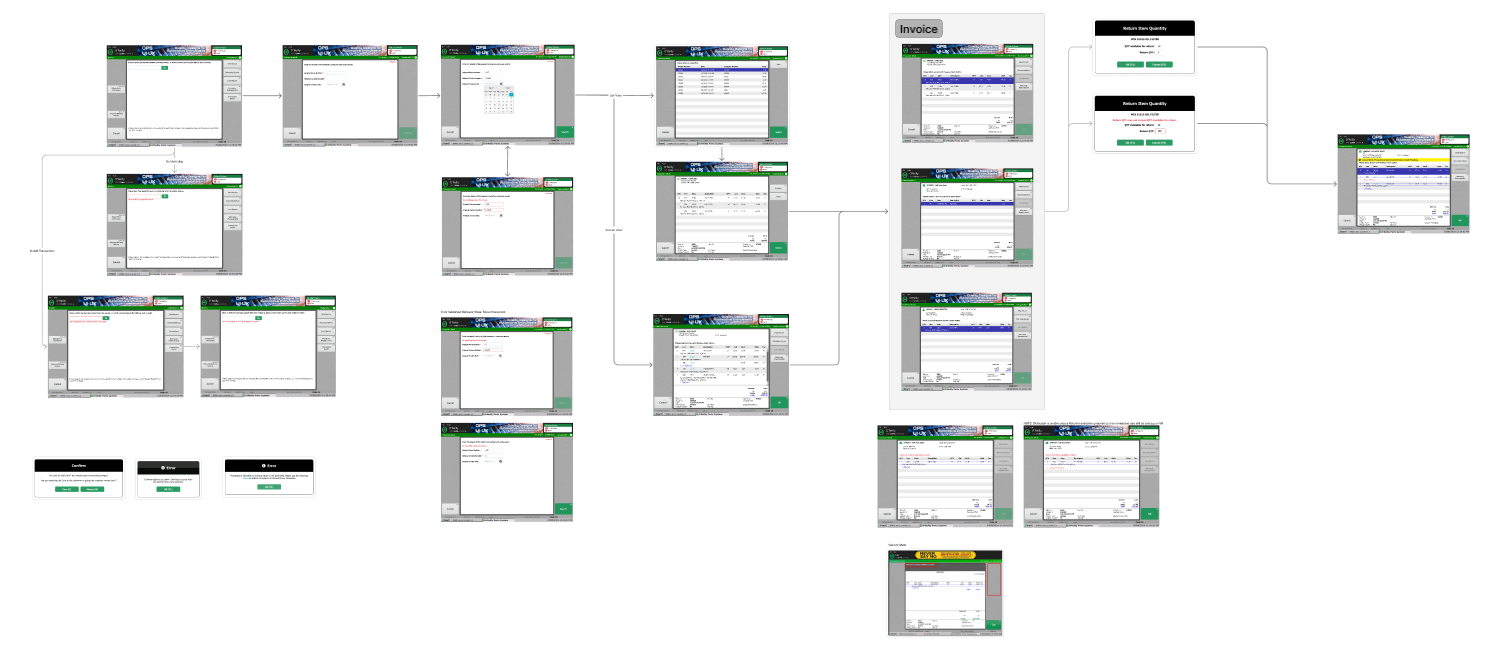
The redesigned experience moved toward a more modern JavaFX-based interface while maintaining the underlying business workflow. Rather than simply updating the visual appearance, I focused on making the interaction easier to understand.
From Legacy Flow to Modern Experience
Original Enactor Experience
Legacy Screens → System Prompt → User Interpretation → Next Action → Additional Screen
Updated JavaFX Experience
Clear Context → Understandable Message → Obvious Action → Next Step
The objective wasn’t to change the workflow’s business purpose. It was to make the existing workflow easier to understand and use.
Designing Within Enterprise Constraints
Redesigning an enterprise POS is different from designing a consumer application. The experience needed to support established business processes while working within technical and operational constraints. I had to consider:
- Existing POS workflows
- Established business rules
- Store employee workflows
- Technical limitations
- System dependencies
- Error and exception states
- Consistency across the broader POS application
This required balancing user experience improvements with the realities of a large enterprise system.
Outcome
The Transactions Recall redesign contributed to the broader modernization of O’Reilly’s POS experience. The work transformed a legacy, multi-step interaction into a more structured and understandable workflow while maintaining the underlying business functionality. The project gave me the opportunity to work at the intersection of:
Enterprise UX + Workflow Design + Business Requirements + Technical Constraints
What This Project Demonstrates
Enterprise Product Design
Designing complex applications used at scale.
Workflow Simplification
Breaking down complicated processes into understandable interactions.
Interaction Design
Creating clear states, prompts, confirmations, and actions.
Legacy Modernization
Improving an established product without losing important business functionality.
Systems Thinking
Understanding how individual screens fit into a larger product workflow.